Strapi
Strapi Permissions & Public APIs: Avoiding Common Security Mistakes
How Strapi's role-based permissions actually work, the specific misconfigurations that leak drafts and private fields, and the checklist we run on every Strapi API before it goes live.
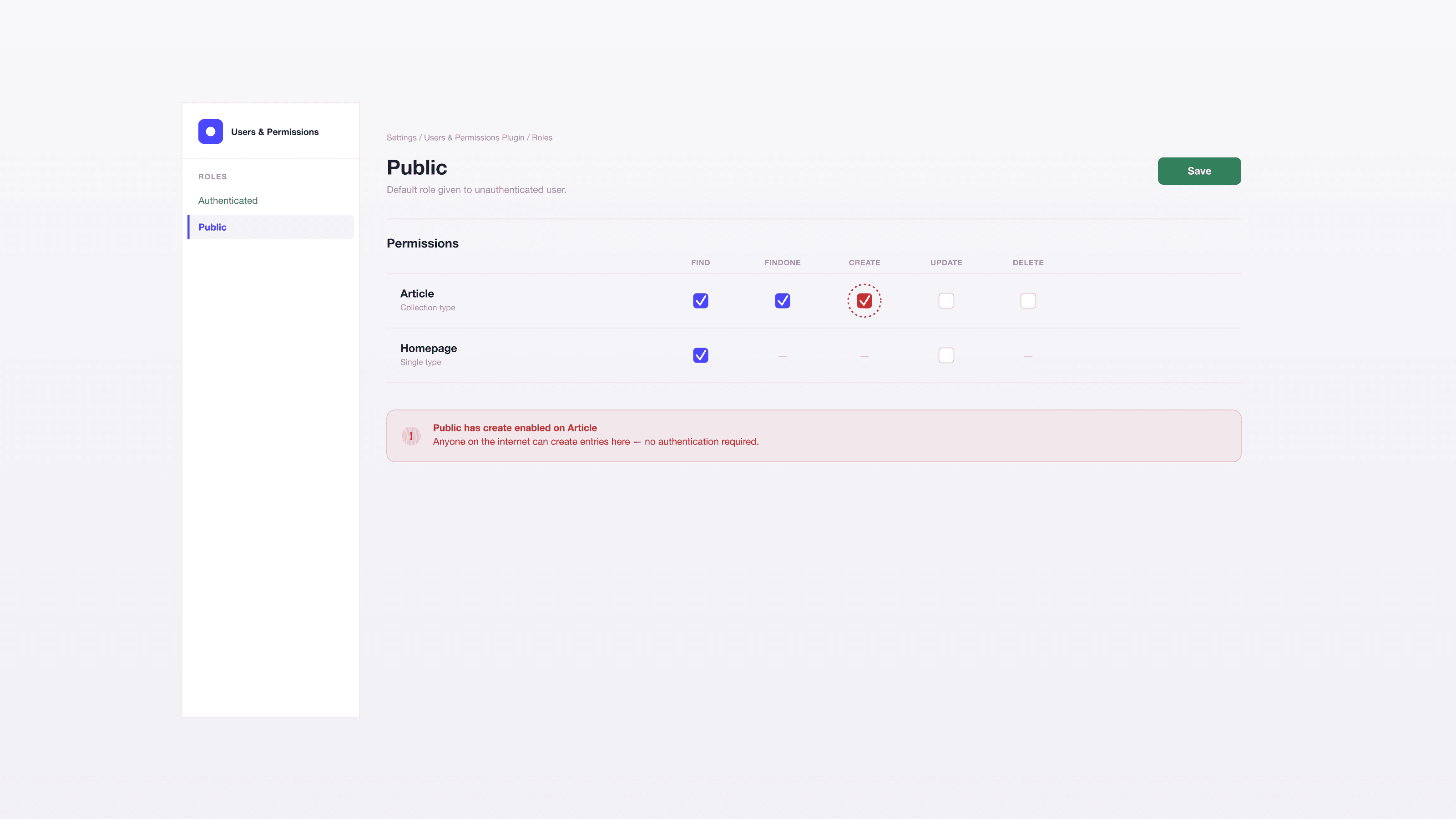
Strapi's permission system is simple enough that teams often configure it once during setup and never revisit it — which is exactly how a "find" permission granted to Public during initial development quietly becomes a production data leak. The mistakes are rarely dramatic; they're usually a single unchecked box that exposes a field, a relation, or an entire content type nobody meant to make public. We audit permissions on every Strapi project we take over, and the same handful of misconfigurations show up often enough to be worth writing down in detail.
How the permission model actually works
Every request to Strapi's API is evaluated against a role. Unauthenticated requests — which is most of what your Next.js frontend sends, since it's fetching public content without a logged-in user — are evaluated against the Public role. Authenticated requests use whatever role is attached to the token or session making the call.
Public should be treated as the most dangerous role in the system, precisely because it's the one every unauthenticated visitor on the internet can exercise, not just your frontend. Anything Public can do, anyone can do, directly against the API, without going through your site at all.
The permissions that matter, per content type:
find/findOne— read access. This is almost always what Public needs, and usually all it needs.create/update/delete— write access. Public should never have these, full stop, unless you have a specific, deliberate use case (a public contact form hitting a dedicated content type, for example) and even then, prefer a server-side API route with its own validation over exposing Strapi's generic write endpoint directly.
Go through every content type in Settings → Users & Permissions → Roles → Public and confirm it grants exactly find/findOne on the collection types meant to be public, and nothing on types that aren't. Single types (Homepage, Site Settings) should generally only need find. This audit takes fifteen minutes and it's the single highest-value security check on a Strapi project.
Draft & Publish: what "published only" actually protects, and what it doesn't
If Draft & Publish is enabled on a content type, Strapi's default behavior for find/findOne under the Public role is to return only published entries — draft content isn't returned even though the permission technically allows read access. This is correct and useful, but it's easy to over-trust: it protects entries with publishedAt: null, not fields marked sensitive within a published entry, and not relations that pull in data from a different content type with its own (possibly misconfigured) permissions.
When your Next.js app needs to preview draft content — the standard case for a marketing team checking a page before it goes live — that request needs its own path:
- A separate role (often called something like "Preview" or "Draft") that's granted
find/findOneincluding unpublished entries, scoped as narrowly as your Strapi version allows. - A token for that role, generated in Settings → API Tokens, with an expiry and a clear owner.
- That token lives in a server-side environment variable and is used from a Next.js Route Handler or Server Component behind
draftMode()— never shipped to the browser bundle or exposed as aNEXT_PUBLIC_variable. If it's in client-side JavaScript, it's public, regardless of what you call it.
The mistake we see most often here: a preview token that works, so it gets copied into a .env.local and eventually into a shared team doc, and six months later nobody remembers it grants draft-content access to whoever has it.
Field-level and relation exposure
Permissions in Strapi are granted per content type and per action, not per field by default in most versions — which means if Public can find a Post, Public gets every field on that Post unless you've deliberately restricted the response shape. This is where private data leaks most often: an "internal notes" field, an author's email address stored on a relation, a draft flag meant for internal workflow, all returned in the same JSON as the title and body.
Two ways to close this, depending on your Strapi version and needs:
- Use field-level permissions if your version supports them (available in more recent Strapi releases) — grant Public access to specific fields rather than the whole entity.
- Build a dedicated public controller or a custom route that explicitly selects and returns only the fields the frontend needs, rather than relying on the default REST response shape. This is more work up front but gives you an explicit, auditable contract for what's public.
For relations — a Post that links to an Author, a Product that links to a Category — only populate what the frontend actually consumes. A populate=* on a query is convenient during development and dangerous in production: it recursively includes related data, and if any related content type (say, an internal Author record with an email field) isn't itself locked down, that data rides along in a response that looks, on the surface, like it's just returning blog posts.
Rate limiting, CORS, and the admin panel
Three infrastructure-level protections that belong on every production Strapi instance, not just high-traffic ones:
- Rate limiting in front of the API — a reverse proxy rule (nginx, Cloudflare) or a Strapi plugin. Without it, a public API is an open invitation to scraping and brute-force enumeration of endpoints.
- CORS restricted to known origins — your production frontend domain and preview/staging URLs, explicitly. A wildcard CORS policy on a CMS API means any website can make authenticated-looking requests from a visitor's browser.
- Admin panel access restricted — by IP allowlist or VPN where the hosting setup allows it. The admin panel is a much larger attack surface than the public API; it doesn't need to be reachable from the open internet for most projects.
Keep Strapi core and all plugins updated. Strapi has shipped security patches for permission-related CVEs before, and an out-of-date instance is running with known, published vulnerabilities.
The audit checklist we run before launch
| Check | What we're looking for |
|---|---|
| Public role, every content type | Only find/findOne on types meant to be public; nothing on the rest |
| Public role, write actions | Zero create/update/delete grants, no exceptions without explicit sign-off |
| Draft content access | Separate role + token, server-side only, never in client bundle |
| Sensitive fields | Explicitly excluded from public responses, not just "probably fine" |
| Relations | populate scoped to what's consumed, not populate=* in production |
| CORS | Allowlist of known origins, no wildcard |
| Rate limiting | Present at the proxy or plugin level |
| Admin panel | IP-restricted or VPN-gated where feasible |
| Core + plugins | Up to date, no known CVEs outstanding |
Why this matters more than it looks like it should
A misconfigured Public role doesn't produce an error. The API works, the frontend renders, everyone moves on — and the leak sits there silently, discoverable by anyone who thinks to hit the REST endpoint directly instead of going through your website. We've inherited more than one Strapi project where the frontend looked completely correct and the underlying API was quietly returning draft content, internal fields, or both, because permissions were set once during a rushed initial build and never revisited.
This is a baseline check we run on every headless CMS implementation we deliver, migration or greenfield — not an optional hardening pass. If you're running Strapi in production and haven't had someone audit the Public role directly against the API (not just the frontend), it's worth fifteen minutes to check, or get in touch if you'd like us to run the audit for you.