Deployment
Staging vs Production: A Release Process Small Teams Can Run
A release flow that catches real problems before production without a dedicated DevOps team — what staging is actually for, where small teams cut corners safely, and where they shouldn't.
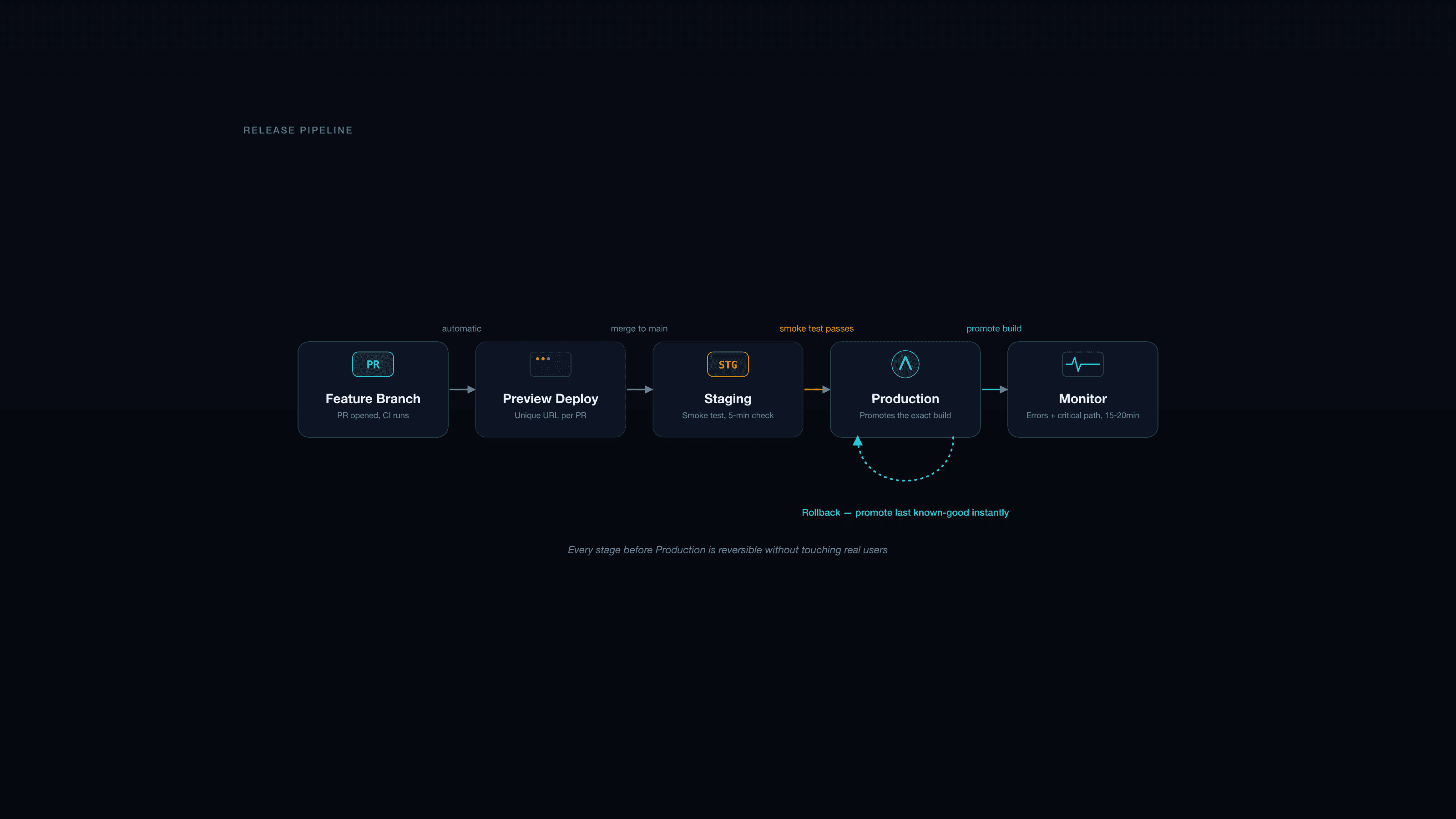
Most small teams don't skip staging because they don't know they should have it. They skip it because the version they imagine — a full production mirror, seeded with sanitized data, gated behind approvals — sounds like a project in itself. So it gets deferred indefinitely, and every release goes straight to production with a mental "it worked locally" as the only safety net.
The gap is smaller than it looks. A staging environment that catches 90% of real problems takes an afternoon to set up on Vercel, Netlify, or Railway, and about the same ongoing effort as none at all once it's automated. The other 10% — the genuinely hard cases, like payment provider webhooks or third-party integrations with no sandbox mode — need judgment calls, not more infrastructure. Here's the flow we run on client projects that don't have (and don't need) a dedicated platform team.
What staging is actually for
Staging exists to answer one question before real users do: does this deploy work, given production-like config, on production-like data? Not "does the code compile" — CI already answers that. Not "does it look right on my machine" — that's what local dev and preview deploys are for. Staging's job is narrower and more specific: catch the class of bug that only shows up when environment variables, database state, and third-party integrations are wired the way they'll actually be wired in production.
That means staging needs to run the same build artifact (or as close as your platform allows) against staging-configured services — a staging Stripe account in test mode, a staging database with realistic-shaped data, staging API keys for anything external. It does not need to be a perfect mirror. It needs to be good enough that "it worked on staging" is actually evidence, not superstition.
The flow
For a small team — one to six developers, no dedicated release engineer — this is the shape that holds up:
- Feature branches, PRs for everything. Even solo projects benefit from a PR as a checkpoint, since it's where CI runs and where preview deploys get generated automatically on Vercel/Netlify.
- Preview deploy per PR. Every branch gets a unique URL automatically. This is where you catch visual regressions and obviously broken flows before anything touches shared staging — cheap, parallel, doesn't block anyone else.
- Merge to
main(or a release branch, if you batch releases instead of shipping continuously). - Auto-deploy to staging on merge. No manual trigger required for this step — if it requires a human to remember, it will eventually get skipped.
- Verify on staging. Run through the specific things that changed in this release, plus a fixed smoke-test list (below). This is a five-minute check, not a full QA pass.
- Promote to production. Ideally this promotes the exact build artifact that was verified on staging rather than triggering a fresh build — Vercel and similar platforms support this directly, and it removes an entire class of "worked on staging, broke in prod because the build differed" bugs.
- Monitor after release. Error tracking (Sentry or equivalent) and a quick manual check of the critical path — login, checkout, whatever the site's core flow is — for the first 15–20 minutes after a release, when regressions are most likely to surface.
If something breaks in production, roll back first, debug second. Promote the last known-good deployment immediately; don't try to hotfix forward under pressure while the site is broken. Fix the actual bug calmly afterward, on a branch, through the same flow.
The smoke test that actually matters
A five-minute staging check only works if it's the same five minutes every time — otherwise it drifts into "look around and hope." Fix a short list per project, something like:
- Log in and log out
- Complete the one core conversion flow (checkout, form submit, signup)
- Load the three or four pages most likely to break from a typical change (usually: homepage, the page type you just changed, and one dynamic/data-driven page)
- Check the browser console for new errors that weren't there before
That's not comprehensive QA — it's a tripwire for the mistakes that are both common and expensive: a broken build that somehow passed CI, an environment variable that didn't get set, a migration that ran against the wrong database.
Environment and data: where teams cut corners safely, and where they shouldn't
Safe to cut: staging data doesn't need to be a live sync of production. Seed data that's representative in shape — enough products, enough content, enough user roles to exercise the same code paths — is good enough for most teams. Refreshing staging from a sanitized production snapshot monthly (not on every deploy) is plenty for most projects; daily refreshes are usually solving a problem you don't have yet.
Not safe to cut: staging must use its own API keys, its own database, and its own third-party credentials — never production credentials pointed at a "staging" label. This is the mistake with the worst failure mode: a staging environment that accidentally sends real emails, charges a real card, or writes to the production database because someone reused a .env file under time pressure. Keep staging and production secrets in completely separate stores in your hosting platform (Vercel's Preview/Production environment variable split, or equivalent), and never let a developer's local .env bridge the two.
Who approves what
Most small teams don't need a formal gate for staging — let anyone deploy there freely; that's the point of having a low-stakes environment. Production is where a second pair of eyes earns its keep, even informally: a Slack message with the diff, or a five-second "does this look right" before promoting. You don't need a change-approval board. You need one other person to have looked at what's about to go live.
Write the process down as a one-pager — not because any one step is complicated, but because six months from now, a new hire or a rushed Friday-afternoon release is exactly when the undocumented tribal knowledge fails. "Where do I click to roll back" should have a written answer, not require finding the one person who remembers.
Where this flow breaks down (and what to do instead)
This lightweight process assumes deploys are stateless and reversible — true for most marketing sites, most SaaS frontends, most content platforms. It gets harder when:
- Database migrations are involved. A schema change can't always be "rolled back" by re-promoting an old build if the new build already wrote data in the new shape. Migrations need their own discipline — backward-compatible changes deployed ahead of the code that depends on them, not bundled into the same release.
- Third-party webhooks have no sandbox mode. Some payment or CRM integrations only have one real endpoint. For these, staging can validate everything except the live webhook path — that specific integration needs manual, careful testing in production with real (small) transactions, ideally off-peak.
- Multiple services deploy independently. Once you're coordinating a frontend, an API, and a CMS release together, "deploy to staging, verify, promote" needs to happen per-service with compatibility checked between versions — which starts to genuinely need more process, not less.
For most client projects we ship — Next.js frontends on Vercel, with a headless CMS or a straightforward API layer — the seven-step flow above is the right amount of process. We wire it in as part of web application development and product engineering retainers so releases stay boring, which is exactly what you want them to be. If your team is shipping straight to production today and wants a staging flow that doesn't turn into a second full-time job, get in touch — this is usually a half-day of setup, not a project.