CMS Architecture
Building a Page Builder Model: Sections, Blocks, and Guardrails
Sections-and-blocks solves the schema shape — guardrails are what stop a flexible page builder from becoming a broken-layout support queue. The validation, constraints, and mapping-registry patterns that hold up in production, CMS-agnostic.
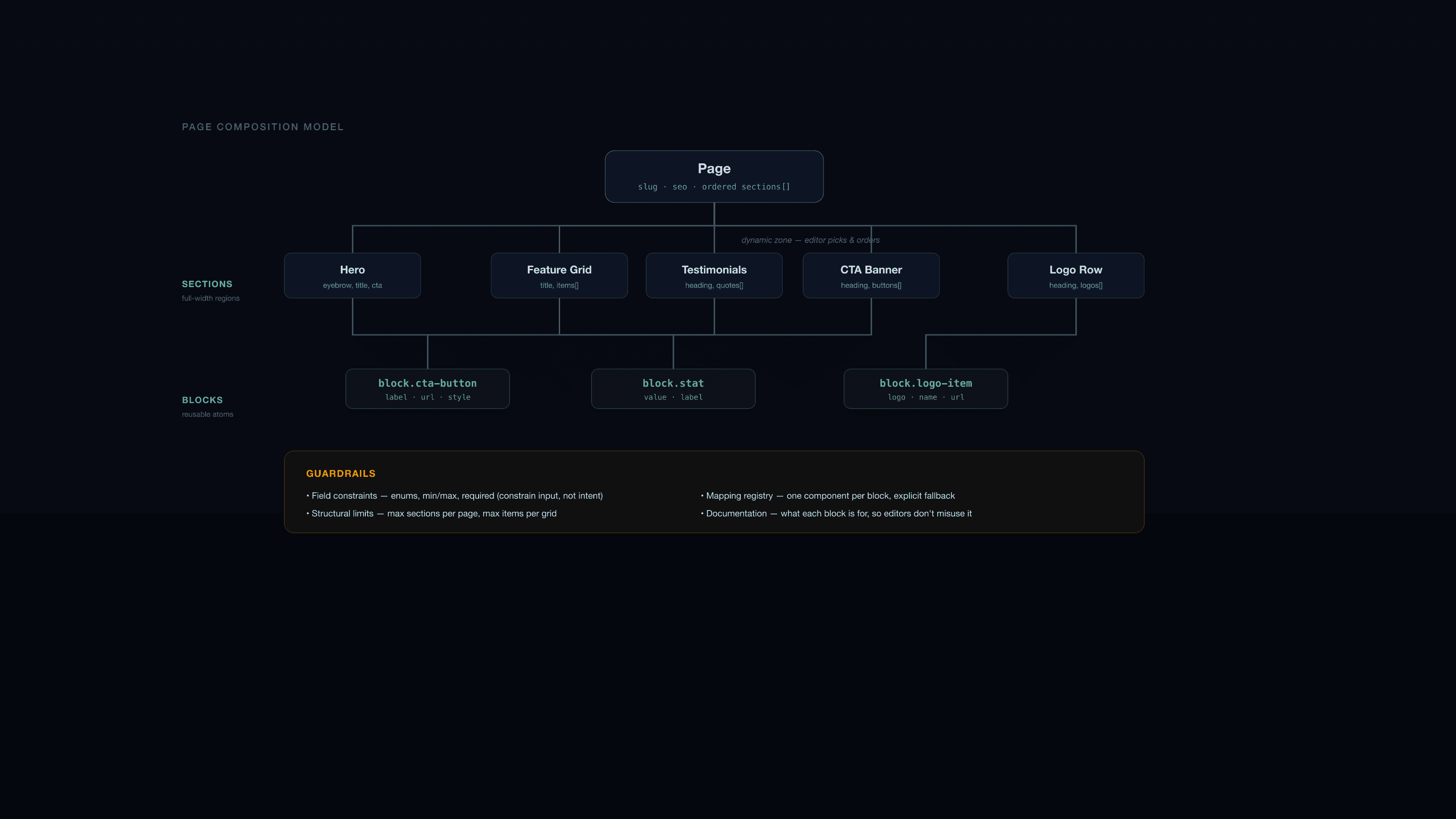
Getting the sections-and-blocks shape right — see our Strapi-specific walkthrough for that schema design in detail — solves maybe half the page builder problem. The other half is what happens six months after launch, when an editor sets a hero's background to a color that makes white text unreadable, pastes a fifteen-word URL into a button meant for a two-word label, or stacks eleven feature cards into a grid designed for four. None of that is a schema problem. It's a guardrails problem — the constraints, validation, and defensive frontend code that keep a flexible page builder from turning into a support queue. This is CMS-agnostic; the same guardrails apply whether you're building on Strapi, Contentful, Sanity, or a custom admin.
Why guardrails matter more than the schema
A page builder's entire value proposition is letting editors compose pages without a developer in the loop. That value proposition breaks the first time an editor's innocent choice — a long headline, an unusual color combination, an empty required-feeling field — produces a broken or ugly page in production. When that happens enough times, the team's trust in the page builder erodes, and you end up back where you started: developers building pages by hand because "the page builder is unpredictable."
Guardrails are what keep the promise. They're not about restricting what editors can do — they're about making it hard to accidentally do something that breaks the layout, while leaving genuine creative choices open.
Field-level guardrails: constrain the input, not the intent
Use enums instead of free text wherever the field maps to a fixed set of layout behaviors. "Style" (light/dark), "layout" (two-column/stacked/centered), "size" (compact/default/large) — these aren't creative writing fields, they're switches the frontend branches on. A free-text field here means the frontend has to defensively handle arbitrary strings; an enum means the editor picks from a dropdown of options that are all guaranteed to render correctly, because they're the only options that exist.
Validate length and content on anything that flows into a fixed layout slot. A button label field with no max length will eventually get a full sentence pasted into it, and it will look wrong in a button designed for two to four words. Set a sensible max length (enforced in the CMS, not just suggested in a content guide nobody reads) and let the design account for the realistic range, not the theoretical one.
Require alt text on every image used in content, and make it genuinely required — not a field that's technically optional but "should" be filled in. Optional-in-practice accessibility fields don't get filled in under deadline pressure; required fields do. Reserve genuinely optional alt text for purely decorative images where a screen reader should skip the element entirely (empty alt, not missing alt).
Constrain media dimensions or aspect ratio where the layout depends on it. A hero image slot designed for a 16:9 crop will look wrong with a tall portrait upload; either constrain the upload (some CMSs support aspect-ratio-aware cropping tools) or have the frontend crop defensively — but decide which, deliberately, rather than discovering the gap when a stretched or cropped image ships to production.
Structural guardrails: limits that prevent slow, unwieldy pages
Cap the number of items in repeatable lists — a feature grid designed for three to six cards will look broken (or just bad) with fourteen, and a testimonial band with twenty entries is a scrolling problem, not a design. Set a max in the schema where your CMS supports it; where it doesn't, document the limit and have the frontend degrade gracefully (truncate, paginate, or visually flag) rather than rendering all fourteen and calling it the editor's problem.
Cap sections per page, loosely. There's rarely a hard technical limit, but a marketing page with forty sections is almost always a sign that content that should be its own page got appended instead. A soft warning in the editor UI, or just a documented norm the team follows, prevents pages from growing indefinitely.
Watch for unbounded nesting. If your page builder allows a section to contain a dynamic zone of sub-blocks in flexible order, an editor can eventually construct a structure your frontend never anticipated — a testimonial block nested inside a feature card nested inside a CTA banner. Keep nesting shallow (one level: page → sections → blocks) unless you have a concrete, recurring need for more, because every additional level of nesting is a combinatorial increase in the layouts your frontend has to handle correctly.
Front-end mapping: one registry, explicit fallback
Every section type needs exactly one place in the codebase that maps it to a component — a registry object, not a scattered set of conditionals across multiple files. This is the single change that makes adding a new section type a contained, reviewable diff instead of a hunt across the codebase for every place section types get handled.
const sectionComponents = {
  hero: HeroSection,
  features: FeaturesSection,
  cta: CTASection,
  testimonials: TestimonialSection,
} as const;

function PageBuilder({ sections }: { sections: Section[] }) {
  return (
    <>
      {sections.map((section) => {
        const Component = sectionComponents[section.type];
        if (!Component) {
          // Log, don't silently drop — a missing mapping is a bug to catch,
          // not a section to render as blank space.
          console.error(`No component registered for section type: ${section.type}`);
          return null;
        }
        return <Component key={section.id} {...section} />;
      })}
    </>
  );
}
The fallback behavior matters as much as the happy path. A section type that exists in the CMS but has no matching frontend component — because a developer added it to the schema but hasn't shipped the component yet, or because of a typo in either place — should fail loudly in development and gracefully (skip, don't crash the page) in production, with something logged or alerted so it gets caught. Silently rendering nothing is the worst outcome: the page looks fine to a quick glance, and the missing section goes unnoticed until someone specifically checks for it.
Type or validate the API response shape, especially if the CMS API can return fields you don't expect (a field renamed in the CMS, a component variant added without updating the frontend type). A runtime shape mismatch that silently renders undefined into a layout is much harder to debug than one that throws immediately with a clear error pointing at the actual mismatched field.
Documentation: the guardrail that costs nothing to build and everything to skip
Maintain a living list of every section and block type, what it's for, and any limits that apply — even a simple internal doc is enough. This answers the question editors will otherwise guess at: "which section type do I use for a row of client logos," "is there a max on the feature grid," "why does the CTA banner only take one button." Without this, editors improvise, which is exactly the pattern that leads to a Feature Grid being stretched to do a Logo Row's job because nobody knew Logo Row existed.
The guardrails checklist
| Guardrail | Prevents |
|---|---|
| Enums instead of free text for style/layout/size | Frontend has to handle arbitrary, unrenderable values |
| Max length on labels and short text fields | Text overflow breaking fixed-width layout slots |
| Required alt text (genuinely enforced) | Accessibility and SEO regressions shipping under deadline |
| Max items on repeatable lists | Grids/lists that look broken or scroll forever |
| Soft limits on sections per page | Pages that should be split growing indefinitely |
| Shallow nesting (one level: sections → blocks) | Combinatorial layout cases the frontend can't anticipate |
| Single component registry, loud fallback | Silent missing-section bugs in production |
| Living documentation of types and limits | Editors improvising with the wrong section for the job |
Guardrails are a discipline, not a one-time setup
The schema design happens once, at the start of a project. Guardrails need to be revisited every time a new section or block type gets added — each one is an opportunity to skip a constraint under time pressure and regret it three pages later. The projects that stay maintainable years in are the ones where adding a new section type is a checklist (fields, validation, registry entry, documentation), not an ad hoc decision made differently each time by whoever's doing it that week.
We bake this checklist into every headless CMS implementation before editors touch production, regardless of which CMS is underneath — the schema shape and the frontend framework change project to project, but the guardrails discipline doesn't. If your page builder has started producing broken layouts editors didn't expect, that's usually a guardrails gap, not a reason to rebuild the schema — get in touch if you want a second opinion on where the gap is.